PROTOCOL 165
Java
2. Java
Development Kit (JDK) Distributions
4. Java install of an
old version
4.3. SDK versus apt-get management
1. Java
Development Kit (JDK) Distributions
Amazon Corretto.
Azul Platform Core (Zulu)
Oracle Java Downloads.
Microsoft Build of OpenJDK.
SAPMachine.
Azul Platform Prime (Zing)
Oracle uses sdk
management.
2. Installation
2.1. Linux
and WSL2
Java checking:
java -version # Check that java 8 to 18
is installed
sudo update-alternatives --config java #
if several versions of java are installed, select v17
Java install (sdk management):
curl -s "https://get.sdkman.io"
| bash # install sdk and the last version of java
# source
"$HOME/.sdkman/bin/sdkman-init.sh" # optional
Java install (classic management):
sudo apt-get install
openjdk-<version>-jdk
2.2. MacOS
Check Java
version:
java -version # Check that java 8 to 18
is installed
Java install:
https://download.oracle.com/java/17/latest/jdk-17_macos-x64_bin.tar.gz
Then open the terminal and check the Java version again.
If several versions are installed, it is possible to select the appropriate version like this:
VERSION=17 #
version to use
/usr/libexec/java_home -V
echo $JAVA_HOME
export JAVA_HOME=$(/usr/libexec/java_home
-v $VERSION)
java -version
3. Java install of an old version
3.1. apt-get
1) Select the Java Version installed:
sudo update-alternatives --config java #
if several versions of java are installed, select v17 # display only le active
java version all java version are installed with sdk
2) Check Available Versions to install
apt list -a openjdk*
3) Once you identify the version you want, you can install it using the apt-get command. Replace <version> with the desired version number.
sudo apt-get install
openjdk-<version>-jdk
For example, if you want to install Java 8: sudo apt-get install openjdk-8-jdk
4) Select the Java Version:
sudo update-alternatives --config java #
if several versions of java are installed, select v17 # display only le active
java version all java version are installed with sdk
3.2. sdk
If you haven't installed SDKMAN yet, you can install it using the following command:
curl -s "https://get.sdkman.io"
| bash
source
"$HOME/.sdkman/bin/sdkman-init.sh"
Once SDKMAN is installed, you can list available Java versions, and those installed:
sdk list java
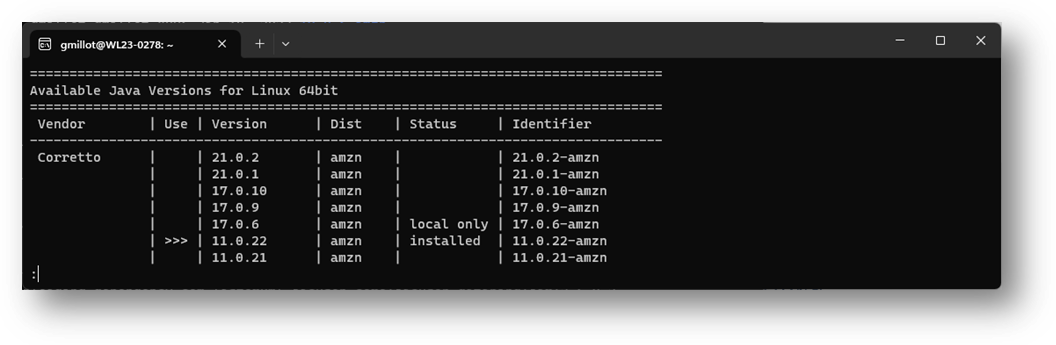
The use column indocates the defaut version.
The status column indocates the installed (local only + installed) versions.
Install OpenJDK 11:
sdk install java 11.0.22-amzn
Replace 11.0.12-amzn with the specific version you want to install.
List the path and the version of java installed, and the default one:
ls -la
/home/gmillot/.sdkman/candidates/java
Set OpenJDK 11 as the default version:
Verify the Java version:
java -version
This will install OpenJDK 11 using SDKMAN. The version number may vary depending on the specific version available at the time of installation. Ensure you replace the version numbers in the commands with the desired version you want to install.
3.3. SDK
versus apt-get management
This explains why
sudo update-alternatives --config java
does not return all the installed versions of java, but only those using apt-get and the active java version, even installed by sdk.
If sudo update-alternatives --config java is showing only Java 11 and not Java 17, it means that the Java 17 installation may not have been registered with the alternatives system. To resolve this, you can manually add the Java 17 installation to the alternatives. Assuming OpenJDK 17 is installed in the /usr/lib/jvm/openjdk-17 directory, you can follow these steps:
To handle OpenJDK 17 installed with SDKMAN, you can use the sdk command to set the default Java version. List all available versions managed by SDKMAN:
sdk list java
Set OpenJDK 17 as the default version:
sdk default java 17.0.6-amzn